
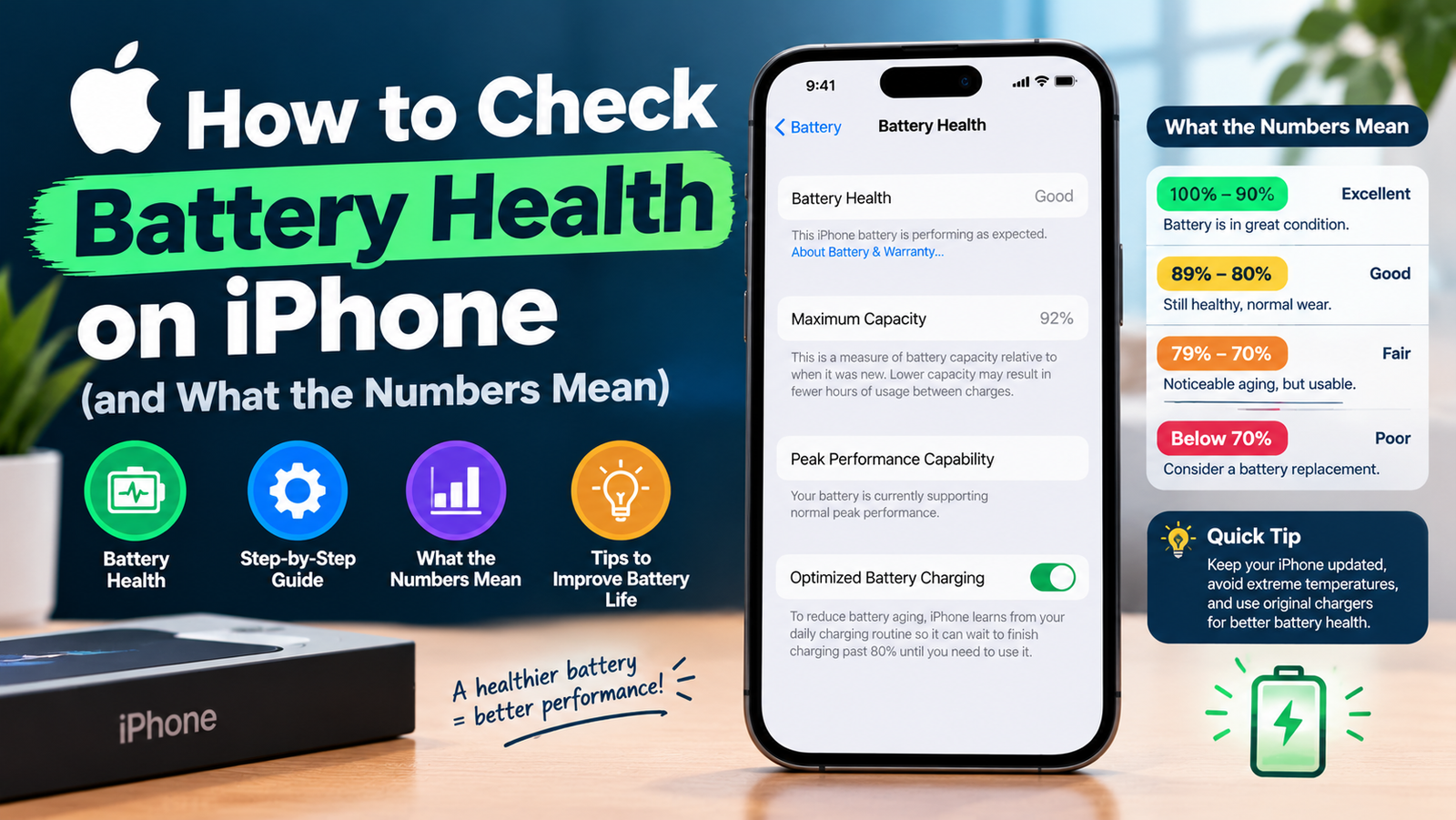
To check battery health on iPhone, open Settings, tap Battery, then tap Battery Health. You will see your battery’s Maximum Capacity as a percentage and a Peak Performance Capability message. Anything around 80% or higher is normal for a battery that has been in use for a while; below that, a replacement is worth considering.
That takes ten seconds. Understanding what the screen is telling you takes a little longer, so here is a clear explanation of every number and message, plus how to find your cycle count.
Step-by-Step: Battery Health Check on iPhone
- Open the Settings app.
- Scroll down and tap Battery.
- Tap Battery Health (on some iOS versions it is labelled Battery Health & Charging).
- Read the Maximum Capacity percentage and the Peak Performance Capability line beneath it.
Apple says the Battery Health screen is available on iPhone 6 and later. Apple’s own guide, iPhone battery and performance, is the official reference for everything below.
What “Maximum Capacity” Means
Maximum Capacity compares your battery’s current capacity with what it held when it was new. At 90%, a full charge gives you roughly 90% of the runtime a brand-new battery would.
| Maximum Capacity | What it usually means |
|---|---|
| 95-100% | Like new. A brand-new iPhone may show slightly under 100%. |
| 85-94% | Normal wear. Most people will not notice much difference. |
| 80-84% | Noticeably shorter battery life. Start planning a replacement. |
| Below 80% | Significant wear. iOS may warn you, and a replacement will clearly help. |
The 80% Rule: How Long iPhone Batteries Are Designed to Last
Apple designs batteries to keep 80% of their original capacity after a set number of full charge cycles, under ideal conditions:
- iPhone 14 and earlier: 80% at 500 complete charge cycles
- iPhone 15 models: 80% at 1,000 complete charge cycles
One charge cycle means using 100% of the battery’s capacity in total, not necessarily in one go. Draining 50% today and 50% tomorrow counts as one cycle.
Peak Performance Capability Messages Explained
“Your battery is currently supporting normal peak performance.”
Everything is fine. No performance management is applied.
Performance management has been applied
Your iPhone shut down unexpectedly because the battery could not deliver enough power, so iOS is limiting peak performance to prevent it happening again. You can switch this off on the same screen, but it will turn back on automatically after another unexpected shutdown.
“Your battery’s health is significantly degraded.”
Apple says this is not a safety issue, but you will likely notice shorter battery life and slowdowns. An Apple Authorized Service Provider can replace the battery.
“Unable to verify this iPhone has a genuine Apple battery”
Shown on iPhone XS and later when the battery cannot be verified as genuine, so the health figures may not be accurate.
How to Check Your iPhone Battery Cycle Count
iPhone 15 and newer: go to Settings > General > About and scroll down. You will see Cycle Count along with the battery’s manufacture date and first use date.
Older iPhones: there is no simple cycle count screen. Some people find it in Settings > Privacy & Security > Analytics & Improvements > Analytics Data by opening a recent analytics file and searching for “cycle_count”, but this only works if analytics sharing is turned on, and the files are hard to read. An Apple Store or authorized repair shop can also run a diagnostic for you.
7 Habits That Slow Down Battery Wear
- Keep Optimized Battery Charging on. It delays charging past 80% when your iPhone learns your routine.
- Avoid heat. Do not leave your phone in a hot car or charge it under a pillow.
- Remove thick cases while charging if the phone gets warm.
- Use quality chargers and cables, ideally Apple or MFi-certified.
- Keep iOS updated, since updates often include battery management improvements.
- Turn on Low Power Mode on long days instead of draining to 0%.
- Store at about 50% if you will not use the phone for weeks.
Battery drain can also come from apps running in the background. If you recently removed apps and want to check what was deleted, our guide on how to see recently deleted apps on iPhone shows where to look.
When Should You Replace Your iPhone Battery?
Consider a replacement when Maximum Capacity drops below 80%, when you see the “significantly degraded” message, or when your phone shuts down unexpectedly at 20-30%. Batteries are covered by Apple’s one-year warranty if defective, and AppleCare+ covers batteries that fall below 80%. If you are weighing a new phone instead, our iPhone 17 vs 17 Pro comparison may help.
iPhone Battery Health FAQ
What is a good battery health for an iPhone?
Anything above 80% is considered healthy. Above 90% is excellent for a phone more than a year old.
Is 85% battery health bad?
No. 85% is normal wear. You may notice slightly shorter battery life, but a replacement is not necessary yet.
Why is my new iPhone not at 100%?
Apple notes that a new iPhone can show slightly less than 100% depending on how long it sat between manufacturing and activation.
Can battery health go back up?
Not really. It can shift slightly after software recalibration, but chemical wear is permanent. Only a battery replacement restores full capacity.
Where is cycle count on iPhone?
On iPhone 15 and later, go to Settings > General > About. Older models do not show it in Settings.