
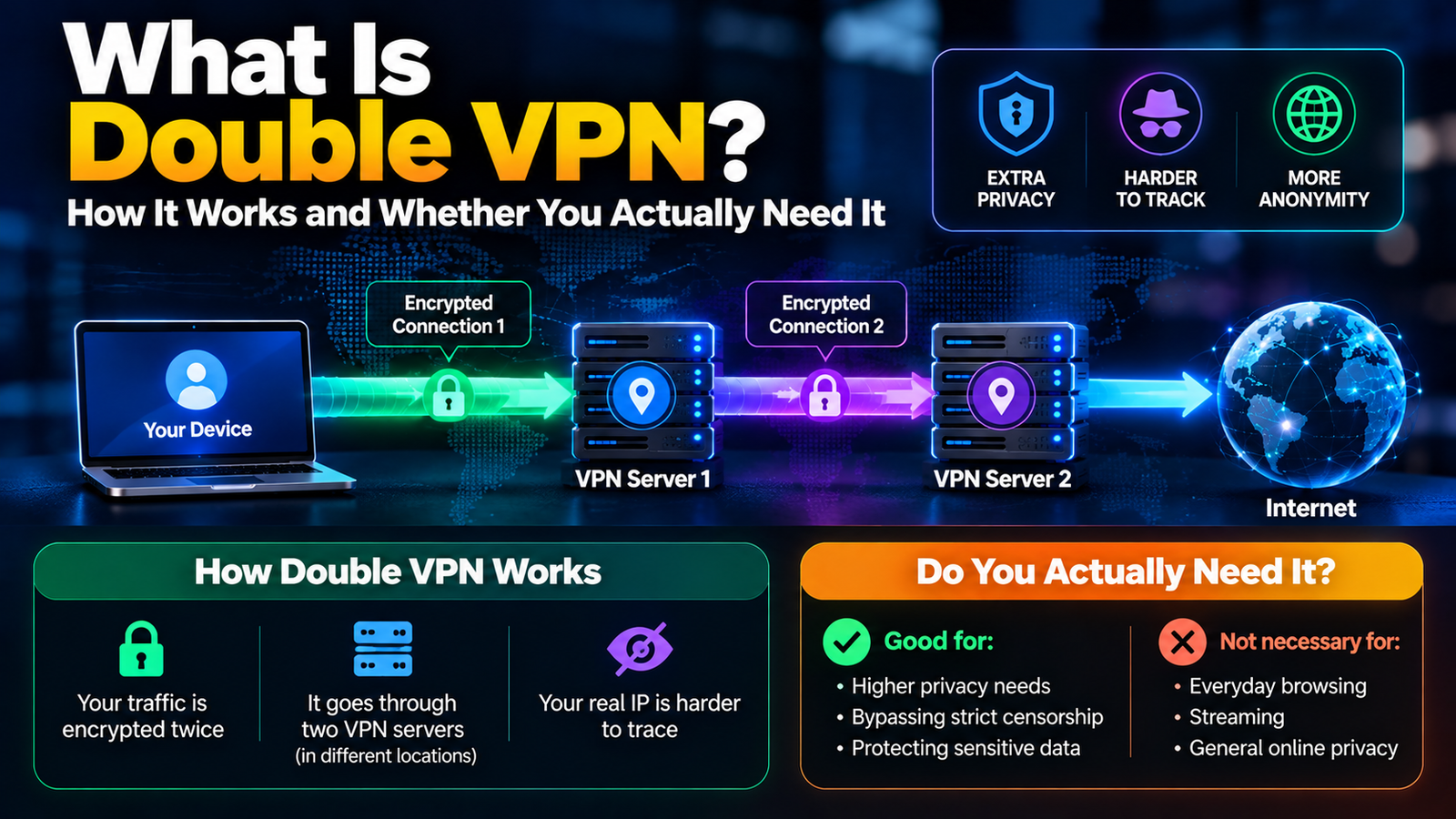
Double VPN is a feature that sends your internet traffic through two VPN servers in a row and encrypts it twice, so that no single server knows both who you are and what you are connecting to. You may also see it called multi-hop, MultiHop or Secure Core, depending on the provider.
It adds a real layer of privacy, and it also slows your connection. For most people a normal VPN is enough. Here is how it works, and how to tell which group you are in.
How Double VPN Works, Step by Step
With a standard VPN, your traffic goes from your device to one VPN server and then out to the internet. We cover that basic setup in what a VPN is and how it works. Double VPN adds a second stop.
- Your device encrypts your data and sends it to the first VPN server.
- The first server encrypts it again and passes it to a second VPN server, usually in a different country.
- The second server removes the encryption and sends your request to the website.
- The reply comes back along the same path in reverse.
The result is a split in what each party can see:
| Who | Sees your real IP address? | Sees the site you visit? |
|---|---|---|
| Your internet provider | Yes | No, only that you use a VPN |
| First VPN server | Yes | No |
| Second VPN server | No, only the first server’s address | Yes |
| The website | No, only the second server’s address | Yes |
The encrypted connection between each point is called a tunnel, which we explain in VPN tunneling explained.
What Double VPN Protects You From That a Normal VPN Does Not
- A compromised or monitored server. If someone is watching the exit server, they see the first server’s address, not yours.
- Traffic correlation. Matching the timing of traffic entering and leaving a VPN is harder when two servers in two jurisdictions are involved.
- A single point of trust. Your identity and your activity are never held together on one machine.
What it does not change: it is the same VPN company running both servers, so you still have to trust that provider’s no-logs policy. Double VPN also does nothing about tracking through cookies, browser fingerprinting or the accounts you are logged in to.
The Downsides of Double VPN: Speed, Battery and Server Choice
- Slower speeds. Your data travels further and is encrypted twice. NordVPN itself warns that the longer route makes Double VPN a poor fit for latency-sensitive uses such as online gaming.
- Higher ping. Video calls and games feel the delay more than browsing does.
- Fewer locations. Providers offer only a limited set of server pairs.
- More battery and data use on phones and laptops.
- Protocol limits. On some apps the feature only appears with certain protocols. Our comparison of VPN protocols explains what those are.
Who Actually Needs Double VPN and Who Does Not
It is worth using if you are a journalist protecting a source, an activist or researcher working under heavy surveillance or censorship, a whistleblower, or anyone whose safety depends on not being identified.
You can skip it if you use a VPN for streaming, public Wi-Fi, shopping, everyday privacy from your internet provider, or gaming. A single VPN connection already hides your traffic from the local network and your IP address from websites, and it does so much faster.
A good rule: turn it on for the specific sessions that need it, and leave it off the rest of the time.
Which VPNs Offer Double VPN or Multi-Hop
- NordVPN calls it Double VPN and lists it under specialty servers. Its Double VPN page explains the setup.
- Surfshark calls it Dynamic MultiHop and lets you pick both the entry and exit location.
- Proton VPN calls it Secure Core and routes traffic first through servers it owns in privacy-friendly countries.
Not every VPN has the feature, and some include it only on paid plans, so check before subscribing if it matters to you.
How to Turn On Double VPN in a VPN App
- Open your VPN app and sign in.
- Look for a section named Specialty servers, MultiHop or Secure Core.
- Choose a server pair, or let the app pick the fastest one.
- Connect, then check your IP address on any IP lookup site to confirm it shows the exit country.
If the option is missing, try switching the connection protocol in the app’s settings, since some apps only show it with OpenVPN.
Double VPN vs Tor vs Onion Over VPN
Tor routes your traffic through three volunteer-run relays, with no single company in control. It offers stronger anonymity than double VPN and is considerably slower. Onion over VPN connects you to a VPN first and then into the Tor network. Double VPN sits between a normal VPN and Tor: more private than the first, faster and simpler than the second.
Frequently Asked Questions About Double VPN
Is double VPN safer than a regular VPN?
It is more private against certain threats, such as a monitored server. For everyday risks like public Wi-Fi, a regular VPN already does the job.
Does double VPN make me anonymous?
No tool does that by itself. Websites can still recognize you through logins, cookies and browser fingerprinting.
Is double VPN the same as using two VPN apps at once?
No. Running two separate VPN apps together often causes conflicts and dropped connections. Double VPN is a built-in feature managed by one provider.
How much slower is double VPN?
It depends on the server pair and your connection, but a noticeable drop compared with a single server is normal.
1 thought on “What Is Double VPN? How It Works and Whether You Actually Need It”
Comments are closed.