
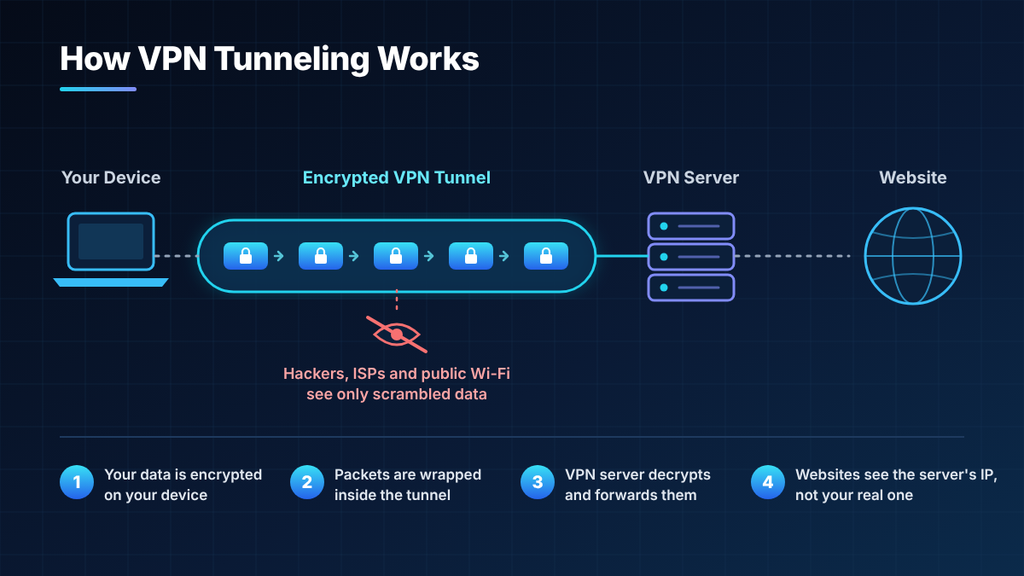
A VPN tunnel is what happens when your device wraps each outgoing data packet inside a second packet addressed to the VPN server. The original packet destination, contents and all becomes cargo. The network only ever sees the outer wrapper.
That wrapping is called encapsulation, and it’s the actual mechanism the word “tunnel” describes. Almost every explanation reaches for an envelope metaphor and stops there, which leaves out the part that matters: encapsulation changes the size and shape of your traffic, and that has consequences you’ll eventually run into.
Follow one packet
Say you request a page from a news site. Without a VPN, your device builds a packet with your IP address as the source and the site’s as the destination, and hands it to your router.
With a VPN running, something extra happens first. The VPN client takes that finished packet, encrypts it, and builds a brand-new packet around it:
| Layer | Contents | Who can read it |
| Outer IP header | Your IP → VPN server IP | Your ISP, anyone on the path |
| Outer UDP/TCP header | Port numbers | Your ISP |
| Protocol header | Session index, counter | Your ISP |
| Encrypted payload | Your original packet, headers included | Only the VPN server |
| Authentication tag | Tamper check | Verified by the server |
Your ISP routes the outer packet normally, because as far as it’s concerned that’s all there is. It sees a steady stream of traffic between you and one address. The destination inside is sealed in the payload.
At the far end, the VPN server strips the wrapper, decrypts the payload, and finds your original packet intact. It then sends that packet on substituting its own IP address as the source, which is why the news site thinks you’re wherever the server is. The reply makes the same trip in reverse.
Nothing is hollowed out of the internet to make a tunnel. The tunnel is an addressing trick: two endpoints agree to treat ordinary packets as containers for other packets.
Tunneling and encryption are two different jobs
These get used interchangeably, and they shouldn’t be. VPN tunneling is the act of encapsulating one network protocol inside packets carried by another network. Encryption is scrambling the contents. You can have either without the other.
The proof is in the protocols. GRE, the tunneling protocol underneath the old PPTP standard, provides no encryption at all PPTP had to bolt on a separate mechanism, and it was broken years ago. L2TP is the same story: pure tunneling, zero confidentiality, which is why you only ever see it written as L2TP/IPsec. The IPsec half is what does the encrypting.
This matters practically. When a provider advertises “military-grade tunneling,” that phrase is doing nothing. The tunnel gets your packets to the server. The cipher protects them on the way. Ask about the cipher.
Which layer the tunnel sits at
Tunnels operate at different levels of the network stack, and the choice affects what gets carried and how the connection behaves.
- Layer 2 (L2TP, OpenVPN in TAP mode). Encapsulates Ethernet frames. Your device behaves as if it’s plugged into the remote network’s switch, which lets non-IP traffic and local network discovery work. Heavier, and rarely what a consumer VPN uses.
- Layer 3 (IPsec, WireGuard, OpenVPN in TUN mode). Encapsulates IP packets. This is the standard for consumer VPNs lighter, faster, and sufficient for anything that runs over IP.
- Over TLS on port 443 (OpenVPN-TCP, SSTP). The tunnel rides inside what looks like an ordinary HTTPS connection. Slower, but it survives networks that block everything else.
That last option comes with a trap worth knowing about. Running a TCP tunnel that carries TCP traffic means two independent retransmission timers stacked on each other. When the link degrades, both start resending, each interpreting the other’s delay as more congestion. Throughput collapses rather than degrading gracefully the classic TCP-over-TCP meltdown. Use UDP where you can, and keep TCP-443 in reserve for restrictive networks.
The overhead problem, and the bug it causes
Here’s the practical consequence nobody mentions. That outer wrapper takes up space, and packets have a size limit the MTU, typically 1500 bytes on home broadband.
If your original packet is already close to 1500 and the VPN adds 60 bytes of headers and authentication tag around it, the result is too big to send. One of three things then happens: the packet gets fragmented, the VPN pre-emptively shrinks what it sends, or the packet is silently dropped.
That third outcome produces one of the most confusing symptoms in networking. The VPN connects. Small pages load. SSH works. But certain sites hang forever and large downloads stall partway. It looks like a server problem and isn’t it’s oversized packets being discarded by a router whose ICMP “too big” replies are being filtered by a firewall somewhere, so your device never learns to send smaller ones.
The fixes are straightforward once you recognise the pattern:
- Lower the tunnel MTU. WireGuard’s tooling defaults to 1420 rather than 1500 for exactly this reason, leaving headroom for its overhead plus anything unusual on the path. Dropping to 1400 or 1360 resolves most stubborn cases.
- Enable MSS clamping. OpenVPN’s mssfix and the equivalent router setting tell TCP connections to negotiate a smaller segment size up front, so oversized packets never get built.
- On a connection using PPPoE, subtract another 8 bytes before you start.
If you take one operational thing from this article, take that. It explains a large share of “my VPN is connected but the internet is broken” reports.
Full, split, and who initiates the tunnel
Two distinctions are worth keeping straight.
Full versus split. Full tunneling forces every byte leaving the device through the encrypted tunnel; split tunneling divides traffic so some apps use the VPN while others go direct at full ISP speed. Split tunneling is genuinely useful it keeps your printer reachable and your bank from flagging a foreign login but it’s a deliberate hole. Anything outside the tunnel is exposed exactly as it would be without a VPN, and DNS queries in particular have a habit of escaping through the wrong path.
Voluntary versus compulsory. A voluntary tunnel is one you start: you open the app and connect. A compulsory tunnel is built by the network itself, with no involvement from your device common in corporate and ISP deployments. If you didn’t press anything and traffic is being tunnelled anyway, it’s compulsory, and someone else controls the endpoint.
Separately, remote-access tunnels connect one device to a network, while site-to-site tunnels connect two networks through gateways at each end. Consumer VPNs are always the former.
What the tunnel still reveals
Encapsulation hides contents, not existence. An observer on your network can see the volume of data you’re moving, the timing and size pattern of packets, and the fact that you’re connected to a known VPN address. That’s enough for traffic analysis in some circumstances, and it’s why obfuscated servers exist they disguise the outer wrapper itself so it doesn’t look like VPN traffic.
Three checks that prove your tunnel is working
Takes about two minutes, and it’s worth doing after any config change.
- Trace the route. Run traceroute 8.8.8.8 (tracert on Windows). With a working full tunnel, the first hop should be the VPN gateway, not your home router. If you still see your router’s address, traffic isn’t entering the tunnel.
- Confirm the exit point. Check your public IP before and after connecting. It should change to the server’s address and stay changed.
- Test DNS separately. Run a DNS leak test. Your queries can escape through your ISP’s resolver even while everything else is correctly inside the tunnel, and that alone reveals every site you visit.