
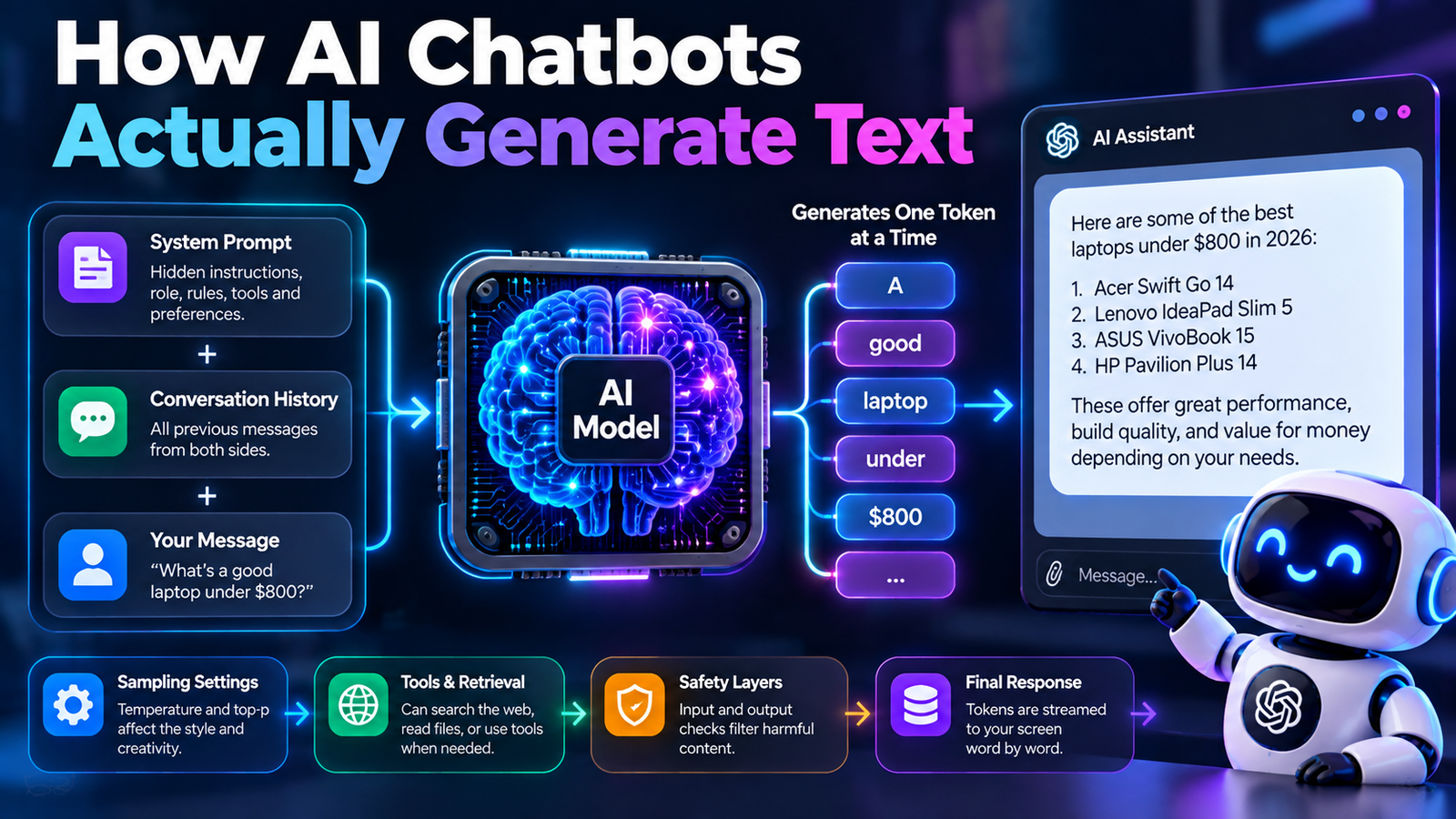
An AI chatbot generates text by handing your message plus a hidden set of instructions and your entire conversation so far to a language model, which produces one token at a time until it emits a signal to stop. The chatbot itself is not the intelligence. It’s the software around the model that assembles the input, runs the generation loop, and decides what you’re allowed to see.
That distinction is the one worth holding onto, because most of what makes ChatGPT feel different from a competitor running the same underlying model happens in that surrounding layer, not in the model.
First, a word about the other kind of chatbot
Search this topic and you’ll find a lot of pages about intent recognition, NLU and decision trees. Those describe a different technology: scripted customer-service bots that match your message to a predefined intent and return a written answer. They’re still widely deployed, and they generate nothing every reply was typed by a human in advance.
This article is about generative chatbots, the kind that compose a new answer each time. If a bot gives you the identical sentence twice for two differently worded questions, it’s the scripted kind.
What the model actually receives
When you type “what’s a good laptop under $800?” the model does not receive that sentence. It receives a single long block of text that the chatbot application builds for it, containing three things.
The system prompt. A set of instructions you never see, written by the company running the product. It typically covers the assistant’s name and persona, what it should refuse, formatting preferences, the current date, and sometimes which tools it can call. It can run to thousands of words.
The conversation so far. Every previous message from both sides, in order.
This is closely related to how context windows work: the model receives the available conversation and instructions within a fixed context limit.
Your new message. Appended at the end.
All three are flattened into one string using special marker tokens that separate the roles something functionally like <|system|>, <|user|> and <|assistant|>, though the exact format differs by model. The model was fine-tuned on text in this shape, so those markers are what tell it “a user said this, now write the assistant’s part”.
This is why the system prompt is powerful and also why it’s fragile. The model has no privileged channel for instructions; everything arrives as tokens in the same stream.
The generation loop
With that block assembled, the loop begins.
The model calculates a probability for every possible next token, one is selected, and it’s appended to the text. Then the whole thing runs again with the slightly longer input. Again. And again, for every token in the reply.
It stops for one of three reasons: the model emits a special end-of-turn token it learned to produce when a response feels complete; the reply hits a maximum length the application set; or the application detects a stop sequence it was told to watch for.
There’s a detail here that surprises people. The model does not plan the answer and then write it. It has no draft. At the moment it produces the first word, the last word does not exist anywhere. Coherence across a long answer comes from each new token being conditioned on everything already written.
Why text appears word by word
That streaming effect isn’t a design flourish meant to look like typing. It’s the generation loop made visible. Tokens are sent to your screen as they’re produced, because waiting for a 600-word reply to finish would mean staring at a blank box for many seconds.
Which also explains something you may have noticed: a chatbot cannot revise what it has already shown you. Once a token is out, it’s part of the input for everything that follows. When a model notices its own mistake mid-answer, the only thing it can do is write a correction after the error, exactly as a person speaking aloud would.

Why two chatbots using the same model behave differently
Several products run on the same underlying models and feel nothing alike. The differences live in the wrapper.
- The system prompt sets tone, length, formatting and what gets refused.
- Sampling settings temperature and top-p are chosen by the product, not by you. A lower setting gives more consistent, more conservative output; a higher one gives more variety.
- Context budget. How much conversation history the app keeps before it starts trimming.
- Which tools are wired in. Web search, code execution, image generation, file reading.
- Safety layers, which are separate systems described below.
None of that changes the model’s underlying knowledge. It changes what the model is asked to do with it.
When the chatbot goes and fetches something
Modern chatbots aren’t sealed. Two mechanisms let them reach outside their training.
Tool use, sometimes called function calling. The model is told in its system prompt which tools exist. When it decides one is needed, it doesn’t call anything it can’t. It writes a structured request, the application spots that request, runs the actual search or calculation, and pastes the result back into the conversation as new context. The model then continues writing with that result in front of it.
Retrieval. Before generating, the application searches a document store or the live web, and inserts the most relevant passages into the context alongside your question. The model answers from text it can see rather than from its weights. This is what powers the versions that cite sources, and it’s the main practical fix for made-up facts.
Both are worth understanding because they explain a common confusion: a chatbot that cites sources isn’t remembering them. It’s reading them, having just been handed them, in the same window as your question.
The layers you never see
Between your message and the reply, most commercial products run additional checks.
An input classifier scans your message before it reaches the model. An output classifier scans the generated reply before it reaches you, and can stop or replace it mid-stream which is why an answer occasionally vanishes and is replaced by a refusal partway through.
These are separate models doing classification, not the chatbot reasoning about your request. It’s why refusals sometimes feel oddly disconnected from the conversation: a different system made that call.
What this means when you use one
Everything above has a practical consequence.
- Your prompt competes with the system prompt. You can’t override instructions the operator set, and asking the bot to reveal them usually produces a plausible-sounding guess rather than the real text.
- Long conversations cost you. History is re-sent every turn and eats the context budget. Start fresh when a thread drifts.
- Put your requirements at the end. Recency in the context carries weight, so the instruction you care about most should be near your message, not buried six turns back.
- Prefer tools that retrieve. If you need facts, use a mode that searches and cites, because it’s reading rather than generating.
- Regenerating is not rethinking. It’s another sample from the same distribution. If the answer was wrong, change the prompt rather than rolling the dice again.