
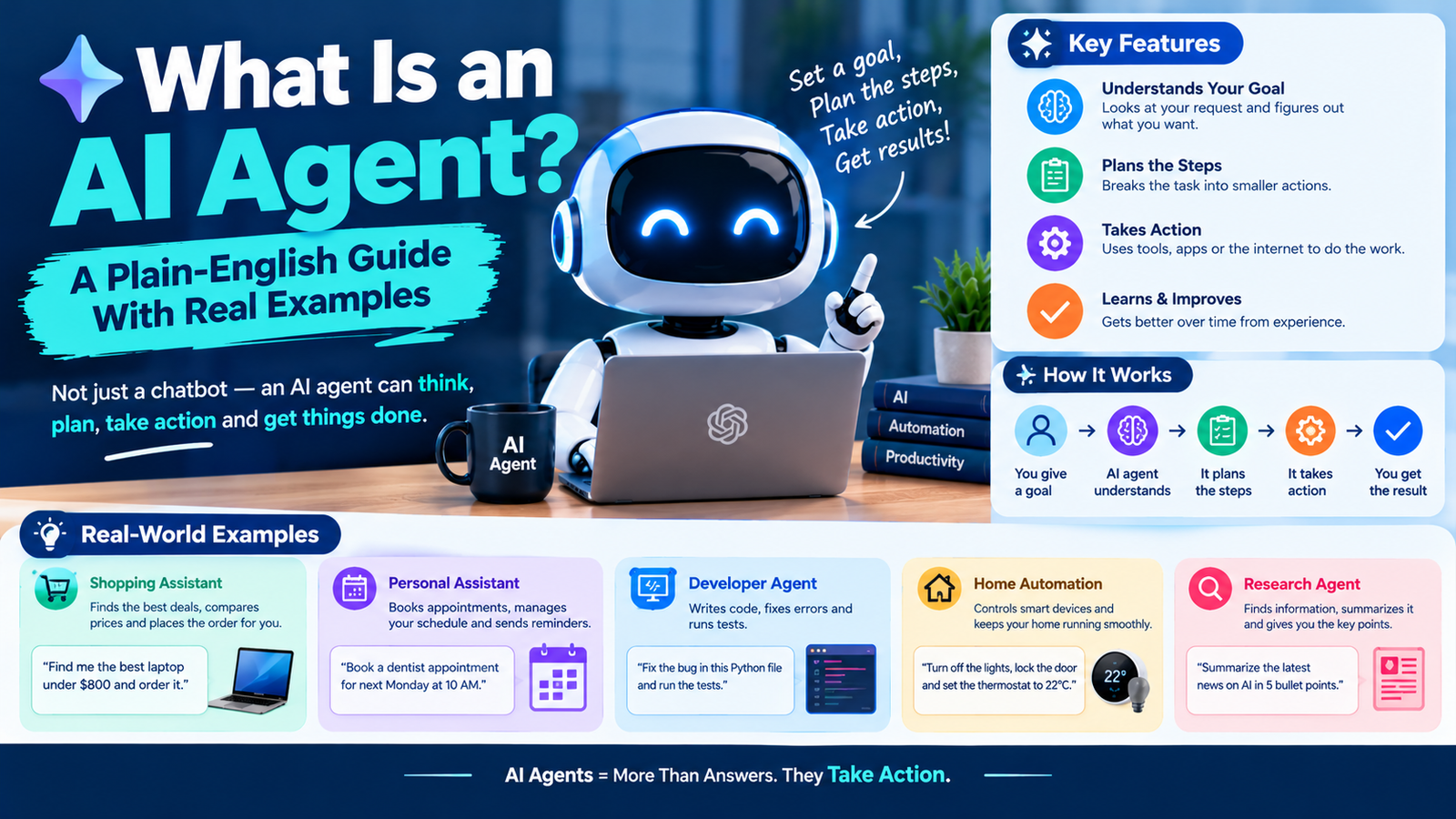
An AI agent is software that uses an AI model to work towards a goal on its own. You give it a task, and it decides which steps to take, uses tools such as web search, code or other apps to carry them out, checks the results, and keeps going until the job is done or it needs your input.
That last part is what separates an agent from a chatbot. A chatbot answers. An agent acts.
AI Agent vs Chatbot: What Is the Actual Difference?
| Chatbot | AI agent | |
|---|---|---|
| What you give it | A question or prompt | A goal |
| What it does | Writes one reply | Plans and carries out several steps |
| Tools | Few or none | Search, files, code, browsers, business apps |
| Who drives | You, one message at a time | The agent, within the limits you set |
| Example | “Summarize this email” | “Sort my inbox, draft replies and flag anything urgent” |
The line is blurry in practice. Most popular assistants now switch into an agent-like mode when a task calls for it, for instance by searching the web several times before answering.
How an AI Agent Works: The Loop Behind Every Agent
Under the surface, nearly every agent runs the same simple cycle.
- It receives a goal. For example: find three hotels in Lisbon under $150 a night with good reviews near the centre.
- It plans. The AI model breaks the goal into steps and picks the first one.
- It uses a tool. It might run a search, open a page, query a database or execute some code.
- It reads the result. The output of that tool is fed back to the model.
- It decides what to do next. Continue, change approach, ask you a question, or stop because the goal is met.
The “brain” in that loop is a large language model, the same kind of model that powers chatbots. If you want to understand that part first, read how AI chatbots actually generate text. What turns the model into an agent is everything wrapped around it: the tools it is allowed to use, the memory it keeps of earlier steps, and the instructions that define its job.
Anthropic’s engineering team makes a useful distinction in its guide to building effective agents: a workflow follows steps a developer laid out in advance, while an agent decides its own steps as it goes.
Real Examples of AI Agents You Can Use Today
- Coding agents. Tools that read a codebase, write changes across several files, run the tests and fix what fails.
- Research agents. “Deep research” modes that run dozens of searches, read the sources and write a cited report.
- Workplace agents. Assistants inside office software that pull together information from email, documents and meetings. Our guide to Microsoft 365 Copilot covers one example.
- Browser and computer-use agents. Agents that click, type and navigate websites for you, such as filling in a form or comparing prices.
- Customer support agents. Systems that look up an order, apply a refund policy and update the ticket without a person stepping in.
- No-code agent builders. Platforms that let you assemble your own agent from blocks. We reviewed two in our guides to Gumloop and Genspark.
The Main Types of AI Agents, From Simple to Autonomous
- Single-task agents do one job, such as triaging support tickets.
- Assistant agents handle varied requests but check in with you often.
- Autonomous agents run for long stretches with little supervision, sometimes for hours.
- Multi-agent systems split a big job between several agents, for example one that plans, several that research and one that reviews.
More autonomy is not automatically better. It means more can get done without you, and also that mistakes can travel further before anyone notices.
What AI Agents Still Get Wrong and How to Use Them Safely
- Errors compound. A wrong assumption in step two can quietly spoil steps three to ten.
- They can be tricked. Text hidden in a web page or email can try to give the agent new instructions. This is called prompt injection.
- They can do real damage with real access. An agent that can send email, delete files or spend money needs tight limits.
- They cost more to run. One task can involve many model calls. See what tokens are and why they cost money for how that adds up.
Three habits keep things under control: give an agent only the access it needs, require your approval before anything irreversible such as sending, paying or deleting, and review its work the way you would review a new colleague’s.
How to Try an AI Agent for the First Time
Start with something low-risk where you can easily check the result. Ask a research mode to compare three products and cite its sources, or let a coding agent make a small change in a test project. Watch what steps it takes. Once you trust it on small jobs, hand over bigger ones.
Frequently Asked Questions About AI Agents
Is ChatGPT an AI agent?
At its core it is a chatbot, but it has agent features. When it browses the web, runs code or completes a multi-step task for you, it is acting as an agent.
Are AI agents the same as automation or bots?
No. Traditional automation follows fixed rules written in advance. An agent uses an AI model to decide what to do, so it can handle situations nobody scripted. IBM has a good overview of how AI agents differ from other AI systems.
Do AI agents learn from experience?
Most do not change their underlying model while working. They can keep notes or a memory of past tasks, which makes them appear to learn.
Will AI agents replace jobs?
They are already taking over individual tasks such as first-draft research, routine support replies and repetitive coding. Whole jobs are a different matter, because most roles involve judgment, accountability and context that agents handle poorly on their own.